AWS ALB Query String, Host Header Redirects and Custom Header Routing
Pre-requisites
- You need a Registered Domain in AWS Route53 to implement this usecase
- Copy your
terraform-key.pemfile toterraform-manifests/private-keyfolder
Step-01: Introduction
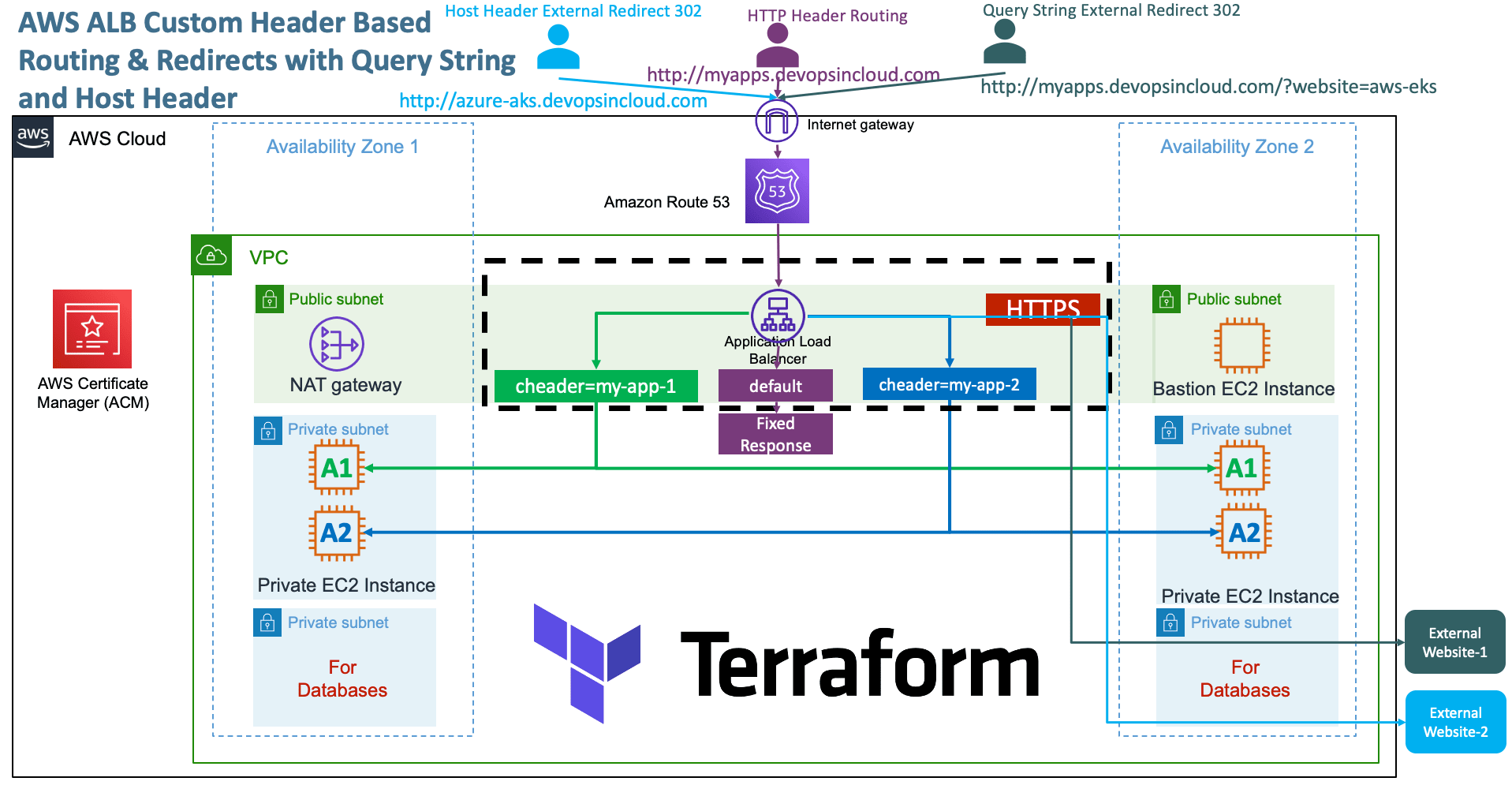
- We are going to implement four AWS ALB Application HTTPS Listener Rules
- Rule-1 and Rule-2 will outline the Custom HTTP Header based Routing
- Rule-3 and Rule-4 will outline the HTTP Redirect using Query String and Host Header based rules
- Rule-1: custom-header=my-app-1 should go to App1 EC2 Instances
- Rule-2: custom-header=my-app-2 should go to App2 EC2 Instances
- Rule-3: When Query-String, website=aws-eks redirect to https://stacksimplify.com/aws-eks/
-
Rule-4: When Host Header = azure-aks.devopsincloud.com, redirect to https://stacksimplify.
-
Understand about Priority feature for Rules
priority = 2
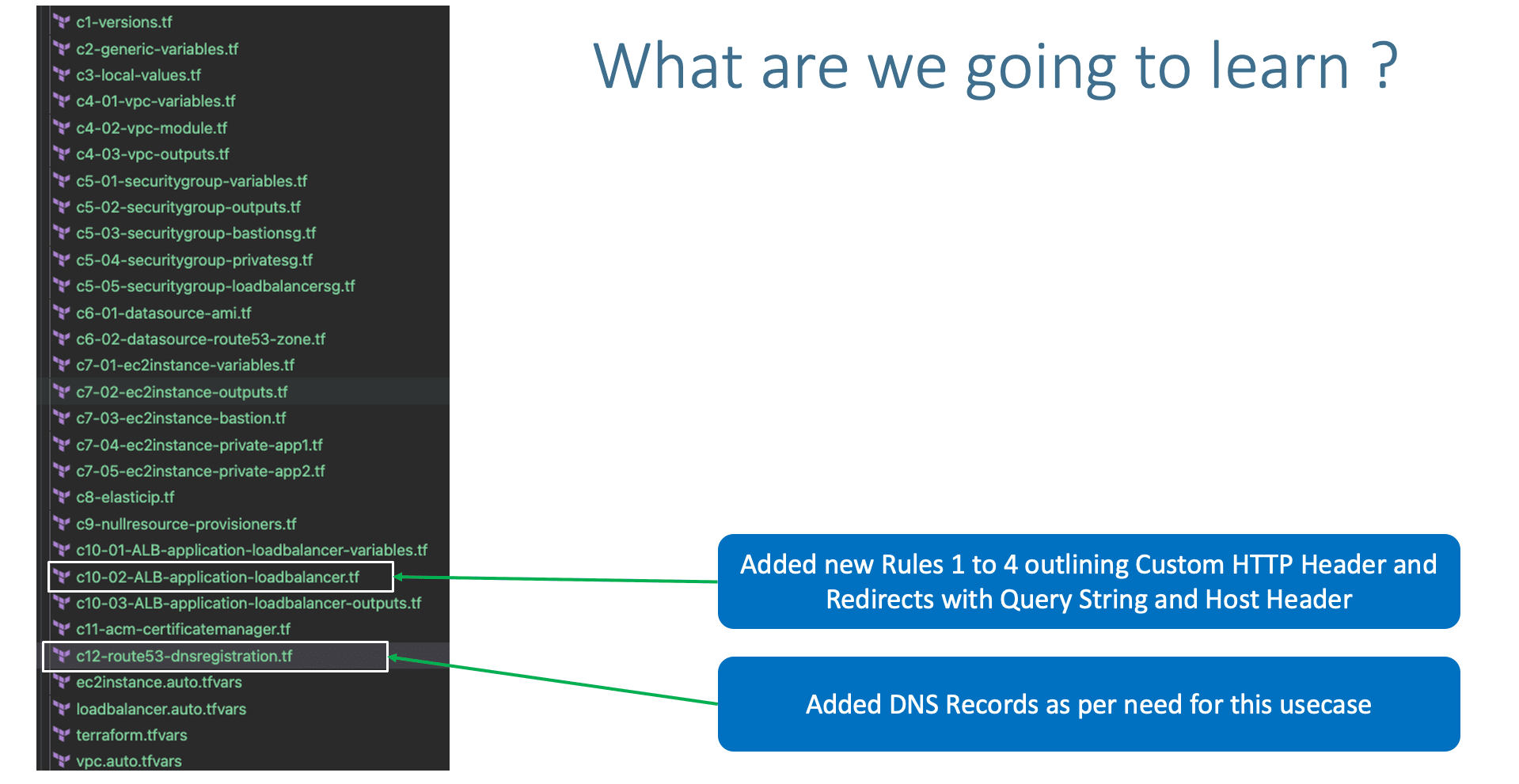
Step-02: c10-02-ALB-application-loadbalancer.tf
- Define different HTTPS Listener Rules for ALB Load Balancer
Step-02-01: Rule-1: Custom Header Rule for App-1
- Rule-1: custom-header=my-app-1 should go to App1 EC2 Instances
    # Rule-1: custom-header=my-app-1 should go to App1 EC2 Instances
    {
      https_listener_index = 0
      priority = 1
      actions = [
        {
          type               = "forward"
          target_group_index = 0
        }
      ]
      conditions = [{
        #path_patterns = ["/app1*"]
        #host_headers = [var.app1_dns_name]
        http_headers = [{
          http_header_name = "custom-header"
          values           = ["app-1", "app1", "my-app-1"]
        }]
      }]
    },
Step-02-02: Rule-2: Custom Header Rule for App-1
- Rule-2: custom-header=my-app-2 should go to App2 EC2 Instances
    # Rule-2: custom-header=my-app-2 should go to App2 EC2 Instances
    {
      https_listener_index = 0
      priority = 2
      actions = [
        {
          type               = "forward"
          target_group_index = 1
        }
      ]
      conditions = [{
        #path_patterns = ["/app2*"]
        #host_headers = [var.app2_dns_name]
        http_headers = [{
          http_header_name = "custom-header"
          values           = ["app-2", "app2", "my-app-2"]
        }]
      }]
    },
Step-02-03: Rule-3: Query String Redirect
- Rule-3: When Query-String, website=aws-eks redirect to https://stacksimplify.com/aws-eks/
  # Rule-3: When Query-String, website=aws-eks redirect to https://stacksimplify.com/aws-eks/
    {
      https_listener_index = 0
      priority = 3
      actions = [{
        type        = "redirect"
        status_code = "HTTP_302"
        host        = "stacksimplify.com"
        path        = "/aws-eks/"
        query       = ""
        protocol    = "HTTPS"
      }]
      conditions = [{
        query_strings = [{
          key   = "website"
          value = "aws-eks"
          }]
      }]
    },
Step-02-04: Rule-4: Host Header Redirect
- Rule-4: When Host Header = azure-aks.devopsincloud.com, redirect to https://stacksimplify.com/azure-aks/azure-kubernetes-service-introduction/
  # Rule-4: When Host Header = azure-aks.devopsincloud.com, redirect to https://stacksimplify.com/azure-aks/azure-kubernetes-service-introduction/
    {
      https_listener_index = 0
      priority = 4
      actions = [{
        type        = "redirect"
        status_code = "HTTP_302"
        host        = "stacksimplify.com"
        path        = "/azure-aks/azure-kubernetes-service-introduction/"
        query       = ""
        protocol    = "HTTPS"
      }]
      conditions = [{
        host_headers = ["azure-aks11.devopsincloud.com"]
      }]
    },
Step-03: c12-route53-dnsregistration.tf
# DNS Registration
## Default DNS
resource "aws_route53_record" "default_dns" {
  zone_id = data.aws_route53_zone.mydomain.zone_id
  name    = "myapps11.devopsincloud.com"
  type    = "A"
  alias {
    name                   = module.alb.this_lb_dns_name
    zone_id                = module.alb.this_lb_zone_id
    evaluate_target_health = true
  }
}

## Testing Host Header - Redirect to External Site from ALB HTTPS Listener Rules
resource "aws_route53_record" "app1_dns" {
  zone_id = data.aws_route53_zone.mydomain.zone_id
  name    = "azure-aks11.devopsincloud.com"
  type    = "A"
  alias {
    name                   = module.alb.this_lb_dns_name
    zone_id                = module.alb.this_lb_zone_id
    evaluate_target_health = true
  }
}
Step-04: Terraform ALB Module v6.0.0 Changes
Step-04-01: c10-02-ALB-application-loadbalancer.tf
Step-04-02: c10-03-ALB-application-loadbalancer-outputs.tf
- ALB Outpus Reference
this_is removed from few of the outputs of ALB Module- So we can use the latest
outputsfrom this section onwards - Update
c10-03-ALB-application-loadbalancer-outputs.tfwith latest outputsoutput "lb_id" { description = "The ID and ARN of the load balancer we created." value = module.alb.lb_id } output "lb_arn" { description = "The ID and ARN of the load balancer we created." value = module.alb.lb_arn } output "lb_dns_name" { description = "The DNS name of the load balancer." value = module.alb.lb_dns_name } output "lb_arn_suffix" { description = "ARN suffix of our load balancer - can be used with CloudWatch." value = module.alb.lb_arn_suffix } output "lb_zone_id" { description = "The zone_id of the load balancer to assist with creating DNS records." value = module.alb.lb_zone_id } output "http_tcp_listener_arns" { description = "The ARN of the TCP and HTTP load balancer listeners created." value = module.alb.http_tcp_listener_arns } output "http_tcp_listener_ids" { description = "The IDs of the TCP and HTTP load balancer listeners created." value = module.alb.http_tcp_listener_ids } output "https_listener_arns" { description = "The ARNs of the HTTPS load balancer listeners created." value = module.alb.https_listener_arns } output "https_listener_ids" { description = "The IDs of the load balancer listeners created." value = module.alb.https_listener_ids } output "target_group_arns" { description = "ARNs of the target groups. Useful for passing to your Auto Scaling group." value = module.alb.target_group_arns } output "target_group_arn_suffixes" { description = "ARN suffixes of our target groups - can be used with CloudWatch." value = module.alb.target_group_arn_suffixes } output "target_group_names" { description = "Name of the target group. Useful for passing to your CodeDeploy Deployment Group." value = module.alb.target_group_names } output "target_group_attachments" { description = "ARNs of the target group attachment IDs." value = module.alb.target_group_attachments }
Step-04-03: c12-route53-dnsregistration.tf
# Before
    name                   = module.alb.this_lb_dns_name
    zone_id                = module.alb.this_lb_zone_id

# After
    name                   = module.alb.lb_dns_name
    zone_id                = module.alb.lb_zone_id
Step-05: Execute Terraform Commands
# Terraform Initialize
terraform init

# Terraform Validate
terraform validate

# Terraform Plan
terraform plan

# Terrform Apply
terraform apply -auto-approve
Step-06: Verify HTTP Header Based Routing (Rule-1 and Rule-2)
- Rest Clinets we can use
- https://restninja.io/
- https://www.webtools.services/online-rest-api-client
- https://reqbin.com/
Step-07: Verify Rule-3
- When Query-String, website=aws-eks redirect to https://stacksimplify.com/aws-eks/
Step-08: Verify Rule-4
- When Host Header = azure-aks.devopsincloud.com, redirect to https://stacksimplify.com/azure-aks/azure-kubernetes-service-introduction/
Step-09: Clean-Up
# Destroy Resources
terraform destroy -auto-approve

# Delete Files
rm -rf .terraform*
rm -rf terraform.tfstate
References
🎉 New Course
Ultimate DevOps Real-World Project Implementation on AWS
$15.99
$84.99
81% OFF
SEP2026
Enroll Now on Udemy →
🎉 Offer