AWS Autoscaling with Launch Configuration using Terraform
Step-00: Create Autoscaling using AWS Management Console
- We are going to create Autoscaling using AWS Management Console to understand things on high level before going to create them using Terrafom
- Create Lauch Configuration
- Create Autoscaling
- Create TTSP Policies
- Create Launch Configurations
- Create Lifecycle Hooks
- Create Notifications
- Create Scheduled Actions
- Important Note: Students who are already experts in Autoscaling can move on to implement the same using Terraform.
Step-01: Introduction to Autoscaing using Terraform
Module-1: Create ASG & LC & ALB
- Terraform Autoscaling Module
- Create Launch Configuration
- Create Autoscaling Group
- Map it with ALB (Application Load Balancer)
- Create Autoscaling Outputs
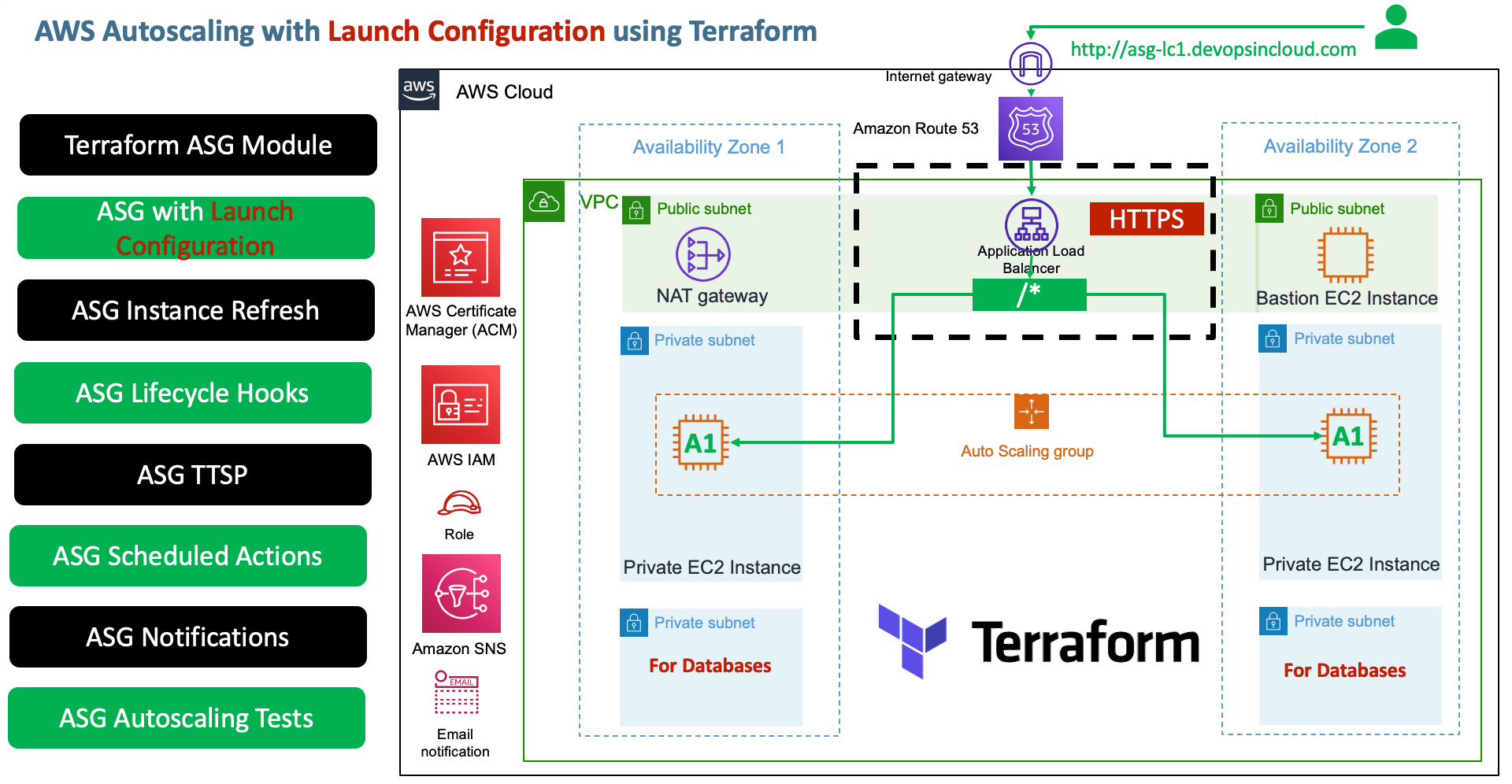
Module-2: Autoscaling Notifications
- Create SNS Topic
aws_sns_topic - Create SNS Topic Subscription
aws_sns_topic_subscription - Create Autoscaling Notification Resource
aws_autoscaling_notification
Module-3: Create TTSP (Target Tracking Scaling Policies)
- Create
Resource: aws_autoscaling_policy - ASGAverageCPUUtilization
- ALBRequestCountPerTarget
- Terraform Import for
ALBRequestCountPerTargetResource Label finding (Standard Troubleshooting to find exact argument and value usingterraform importcommand)
Module-4: Scheduled Actions
- Create a scheduled action to
increase capacity at 7am - Create a scheduled action to
decrease capacity at 5pm# Import State $ terraform import aws_autoscaling_schedule.resource-name auto-scaling-group-name/scheduled-action-name terraform import aws_autoscaling_schedule.capacity_increase_during_business_hours myapp1-asg-20210329100544375800000007/capacity_increase_during_business_hours -> using terraform import get values for recurrence argument (cron format) # UTC Timezone converter https://www.worldtimebuddy.com/utc-to-est-converter
Module-5: Changes to ASG - Test Instance Refresh
- Change Desired capacity to 3
desired_capacity = 3and test - Any change to ASG specific arguments listed in
triggersofinstance_refreshblock, do a instance refresh
Module-6: Change to Launch Configuration - Test Instance Refresh
- What happens?
- In next scale-in event changes will be adjusted [or] if instance refresh present and configured in this module it updates ASG with new LC ID, instance refresh should kick in.
- Lets see that practically
- In this case, we don't need to have
launch_configurationpractically present intriggerssection ofinstance_refreshthings take care automatically
Module-7: Testing using Postman for Autoscaling
- Use postman to put load to test the TTSP policies for autoscaling
Step-02: Review existing configuration files
- c1-versions.tf
- c2-generic-variables.tf
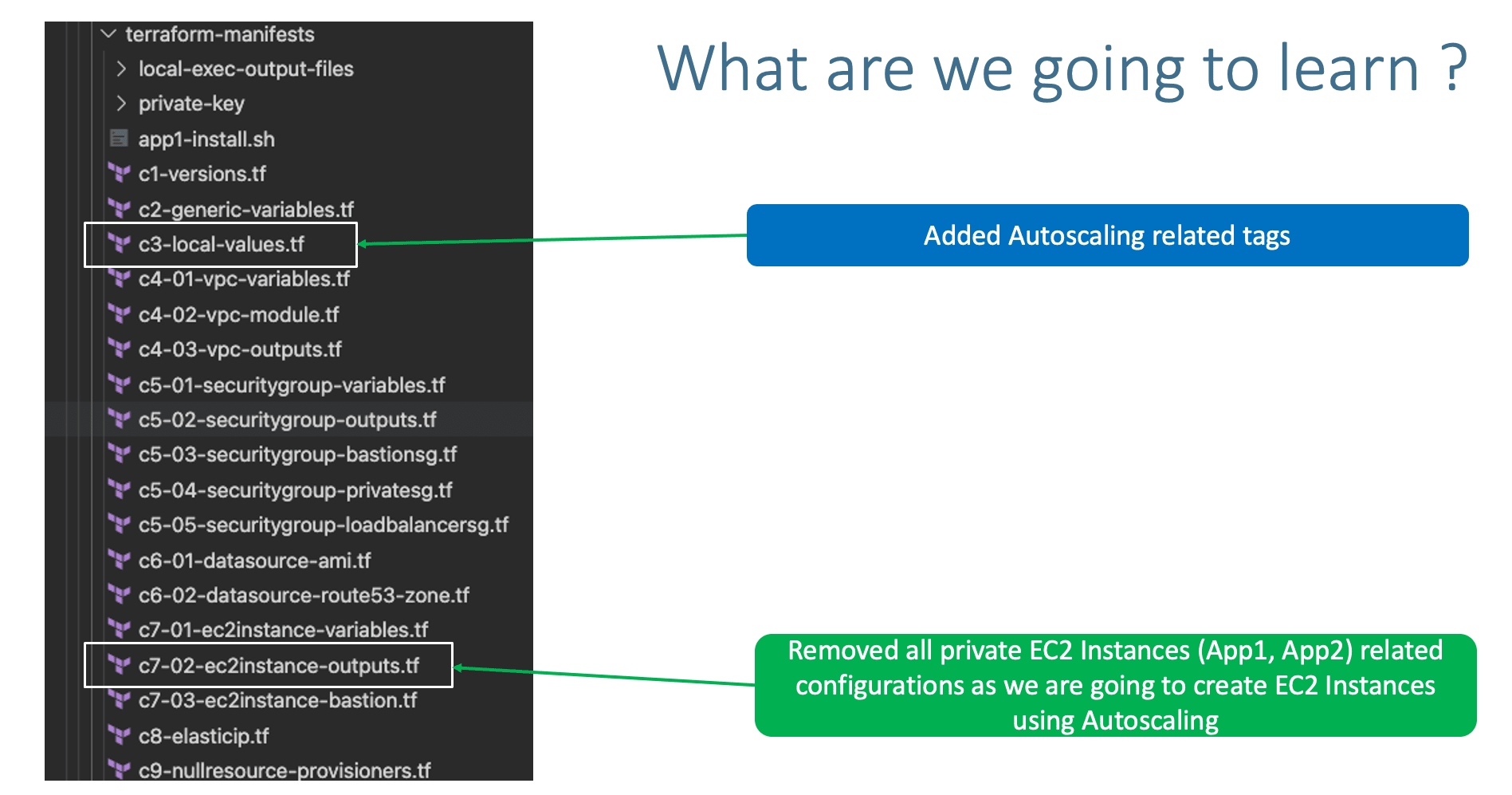
- c3-local-values.tf: ADDED
asg_tags - VPC Module
- c4-01-vpc-variables.tf
- c4-02-vpc-module.tf
- c4-03-vpc-outputs.tf
- Security Group Modules
- c5-01-securitygroup-variables.tf
- c5-02-securitygroup-outputs.tf
- c5-03-securitygroup-bastionsg.tf
- c5-04-securitygroup-privatesg.tf
- c5-05-securitygroup-loadbalancersg.tf
- Datasources
- c6-01-datasource-ami.tf
- c6-02-datasource-route53-zone.tf
- EC2 Instance Module
- c7-01-ec2instance-variables.tf
- c7-02-ec2instance-outputs.tf: REMOVED OUTPUTS RELATED TO OTHER PRIVATE EC2 INSTANCES
- c7-03-ec2instance-bastion.tf
- c8-elasticip.tf
- c9-nullresource-provisioners.tf
- Application Load Balancer Module
- c10-01-ALB-application-loadbalancer-variables.tf
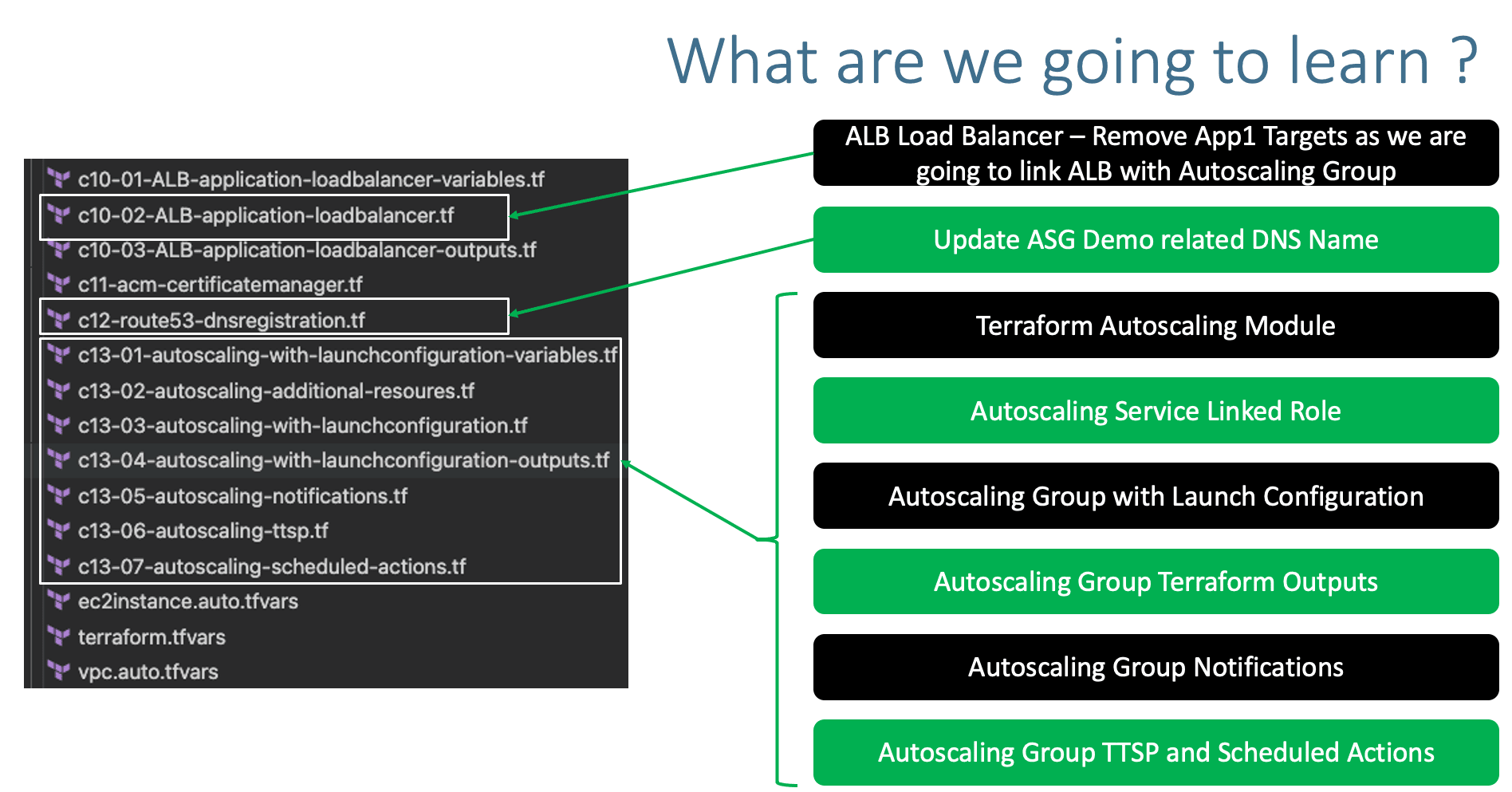
- c10-02-ALB-application-loadbalancer.tf: CHANGES RELATED TO APP1 TG, REMOVE TARGETS, TARGETS WILL BE ADDED FROM ASG
- c10-03-ALB-application-loadbalancer-outputs.tf
- c11-acm-certificatemanager.tf
- c12-route53-dnsregistration.tf: JUST CHANGED THE DNS NAME
- Autoscaling with Launch Configuration Module: NEW ADDITION
- c13-01-autoscaling-with-launchconfiguration-variables.tf
- c13-02-autoscaling-additional-resoures.tf
- c13-03-autoscaling-with-launchconfiguration.tf
- c13-04-autoscaling-with-launchconfiguration-outputs.tf
- c13-05-autoscaling-notifications.tf
- c13-06-autoscaling-ttsp.tf
- c13-07-autoscaling-scheduled-actions.tf
- Terraform Input Variables
- ec2instance.auto.tfvars
- terraform.tfvars
- vpc.auto.tfvars
- Userdata
- app1-install.sh
- EC2 Instance Private Keys
- private-key/terraform-key.pem
Step-03: c3-local-values.tf
  asg_tags = [
    {
      key                 = "Project"
      value               = "megasecret"
      propagate_at_launch = true
    },
    {
      key                 = "foo"
      value               = ""
      propagate_at_launch = true
    },
  ]
Step-04: c7-02-ec2instance-outputs.tf
- Removed EC2 Instance Outputs anything defined for Private EC2 Instances created using EC2 Instance module
- Only outputs for Bastion EC2 Instance is present
## ec2_bastion_public_instance_ids
output "ec2_bastion_public_instance_ids" {
  description = "List of IDs of instances"
  value       = module.ec2_public.id
}

## ec2_bastion_public_ip
output "ec2_bastion_public_ip" {
  description = "List of public IP addresses assigned to the instances"
  value       = module.ec2_public.public_ip
}
Step-05: c10-02-ALB-application-loadbalancer.tf
- Two changes
- Change-1: For
subnetsargument, either we can give specific subnets or we can also give all private subnets defined. - Change-2: Commented the Targets for App1, App1 Targets now will be added automatically from ASG. HOW?
- In ASG, we will be referencing the load balancer
target_group_arns= module.alb.target_group_arns - We will discuss more about this when creating ASG TF Configs
- Change-3: changed the path patter as
path_patterns = ["/*"]# Terraform AWS Application Load Balancer (ALB) module "alb" { source = "terraform-aws-modules/alb/aws" #version = "5.16.0" version = "6.0.0" name = "${local.name}-alb" load_balancer_type = "application" vpc_id = module.vpc.vpc_id /*Option-1: Give as list with specific subnets or in next line, pass all public subnets subnets = [ module.vpc.public_subnets[0], module.vpc.public_subnets[1] ]*/ subnets = module.vpc.public_subnets #security_groups = [module.loadbalancer_sg.this_security_group_id] security_groups = [module.loadbalancer_sg.security_group_id] # Listeners # HTTP Listener - HTTP to HTTPS Redirect http_tcp_listeners = [ { port = 80 protocol = "HTTP" action_type = "redirect" redirect = { port = "443" protocol = "HTTPS" status_code = "HTTP_301" } } ] # Target Groups target_groups = [ # App1 Target Group - TG Index = 0 { name_prefix = "app1-" backend_protocol = "HTTP" backend_port = 80 target_type = "instance" deregistration_delay = 10 health_check = { enabled = true interval = 30 path = "/app1/index.html" port = "traffic-port" healthy_threshold = 3 unhealthy_threshold = 3 timeout = 6 protocol = "HTTP" matcher = "200-399" } protocol_version = "HTTP1" /* # App1 Target Group - Targets targets = { my_app1_vm1 = { target_id = module.ec2_private_app1.id[0] port = 80 }, my_app1_vm2 = { target_id = module.ec2_private_app1.id[1] port = 80 } } tags =local.common_tags # Target Group Tags*/ }, ] # HTTPS Listener https_listeners = [ # HTTPS Listener Index = 0 for HTTPS 443 { port = 443 protocol = "HTTPS" #certificate_arn = module.acm.this_acm_certificate_arn certificate_arn = module.acm.acm_certificate_arn action_type = "fixed-response" fixed_response = { content_type = "text/plain" message_body = "Fixed Static message - for Root Context" status_code = "200" } }, ] # HTTPS Listener Rules https_listener_rules = [ # Rule-1: /app1* should go to App1 EC2 Instances { https_listener_index = 0 priority = 1 actions = [ { type = "forward" target_group_index = 0 } ] conditions = [{ path_patterns = ["/*"] }] }, ] tags = local.common_tags # ALB Tags }
Step-06: c12-route53-dnsregistration.tf
- Update the DNS name relevant to demo
Step-07: Autoscaling with Launch Configuration Terraform Module
Step-07-01: c13-01-autoscaling-with-launchconfiguration-variables.tf
Step-07-02: c13-02-autoscaling-additional-resoures.tf
# AWS IAM Service Linked Role for Autoscaling Group
resource "aws_iam_service_linked_role" "autoscaling" {
  aws_service_name = "autoscaling.amazonaws.com"
  description      = "A service linked role for autoscaling"
  custom_suffix    = local.name

  # Sometimes good sleep is required to have some IAM resources created before they can be used
  provisioner "local-exec" {
    command = "sleep 10"
  }
}

# Output AWS IAM Service Linked Role
output "service_linked_role_arn" {
    value   = aws_iam_service_linked_role.autoscaling.arn
}
Step-07-03: c13-03-autoscaling-with-launchconfiguration.tf
# Autoscaling with Launch Configuration - Both created at a time
module "autoscaling" {
  source  = "terraform-aws-modules/autoscaling/aws"
  version = "4.1.0"

  # Autoscaling group
  name            = "${local.name}-myasg1"
  use_name_prefix = false

  min_size                  = 2
  max_size                  = 10
  desired_capacity          = 2
  wait_for_capacity_timeout = 0
  health_check_type         = "EC2"
  vpc_zone_identifier       = module.vpc.private_subnets
  service_linked_role_arn   = aws_iam_service_linked_role.autoscaling.arn
  # Associate ALB with ASG
  target_group_arns         = module.alb.target_group_arns

  # ASG Lifecycle Hooks
  initial_lifecycle_hooks = [
    {
      name                 = "ExampleStartupLifeCycleHook"
      default_result       = "CONTINUE"
      heartbeat_timeout    = 60
      lifecycle_transition = "autoscaling:EC2_INSTANCE_LAUNCHING"
      # This could be a rendered data resource
      notification_metadata = jsonencode({ "hello" = "world" })
    },
    {
      name                 = "ExampleTerminationLifeCycleHook"
      default_result       = "CONTINUE"
      heartbeat_timeout    = 180
      lifecycle_transition = "autoscaling:EC2_INSTANCE_TERMINATING"
      # This could be a rendered data resource
      notification_metadata = jsonencode({ "goodbye" = "world" })
    }
  ]

  # ASG Instance Referesh
  instance_refresh = {
    strategy = "Rolling"
    preferences = {
      min_healthy_percentage = 50
    }
    triggers = ["tag", "desired_capacity"/*, "launch_configuration"*/] # Desired Capacity here added for demostrating the Instance Refresh scenario
  }

  # ASG Launch configuration
  lc_name   = "${local.name}-mylc1"
  use_lc    = true
  create_lc = true

  image_id          = data.aws_ami.amzlinux2.id
  instance_type     = var.instance_type
  key_name          = var.instance_keypair
  user_data         = file("${path.module}/app1-install.sh")
  ebs_optimized     = true
  enable_monitoring = true

  security_groups             = [module.private_sg.security_group_id]
  associate_public_ip_address = false

  # Add Spot Instances, which creates Spot Requests to get instances at the price listed (Optional argument)
  #spot_price        = "0.014"
  spot_price        = "0.015" # Change for Instance Refresh test

  ebs_block_device = [
    {
      device_name           = "/dev/xvdz"
      delete_on_termination = true
      encrypted             = true
      volume_type           = "gp2"
      volume_size           = "20"
    },
  ]

  root_block_device = [
    {
      delete_on_termination = true
      encrypted             = true
      volume_size           = "15"
      volume_type           = "gp2"
    },
  ]

  metadata_options = {
    http_endpoint               = "enabled"
    http_tokens                 = "optional" # At production grade you can change to "required", for our example if is optional we can get the content in metadata.html
    http_put_response_hop_limit = 32
  }

  tags        = local.asg_tags
}
Step-07-04: c13-04-autoscaling-with-launchconfiguration-outputs.tf
# Launch configuration Outputs
output "launch_configuration_id" {
  description = "The ID of the launch configuration"
  value       = module.autoscaling.launch_configuration_id
}

output "launch_configuration_arn" {
  description = "The ARN of the launch configuration"
  value       = module.autoscaling.launch_configuration_arn
}

output "launch_configuration_name" {
  description = "The name of the launch configuration"
  value       = module.autoscaling.launch_configuration_name
}

# Autoscaling Outpus
output "autoscaling_group_id" {
  description = "The autoscaling group id"
  value       = module.autoscaling.autoscaling_group_id
}

output "autoscaling_group_name" {
  description = "The autoscaling group name"
  value       = module.autoscaling.autoscaling_group_name
}

output "autoscaling_group_arn" {
  description = "The ARN for this AutoScaling Group"
  value       = module.autoscaling.autoscaling_group_arn
}

output "autoscaling_group_min_size" {
  description = "The minimum size of the autoscale group"
  value       = module.autoscaling.autoscaling_group_min_size
}

output "autoscaling_group_max_size" {
  description = "The maximum size of the autoscale group"
  value       = module.autoscaling.autoscaling_group_max_size
}

output "autoscaling_group_desired_capacity" {
  description = "The number of Amazon EC2 instances that should be running in the group"
  value       = module.autoscaling.autoscaling_group_desired_capacity
}

output "autoscaling_group_default_cooldown" {
  description = "Time between a scaling activity and the succeeding scaling activity"
  value       = module.autoscaling.autoscaling_group_default_cooldown
}

output "autoscaling_group_health_check_grace_period" {
  description = "Time after instance comes into service before checking health"
  value       = module.autoscaling.autoscaling_group_health_check_grace_period
}

output "autoscaling_group_health_check_type" {
  description = "EC2 or ELB. Controls how health checking is done"
  value       = module.autoscaling.autoscaling_group_health_check_type
}

output "autoscaling_group_availability_zones" {
  description = "The availability zones of the autoscale group"
  value       = module.autoscaling.autoscaling_group_availability_zones
}

output "autoscaling_group_vpc_zone_identifier" {
  description = "The VPC zone identifier"
  value       = module.autoscaling.autoscaling_group_vpc_zone_identifier
}

output "autoscaling_group_load_balancers" {
  description = "The load balancer names associated with the autoscaling group"
  value       = module.autoscaling.autoscaling_group_load_balancers
}

output "autoscaling_group_target_group_arns" {
  description = "List of Target Group ARNs that apply to this AutoScaling Group"
  value       = module.autoscaling.autoscaling_group_target_group_arns
}
Step-07-05: c13-05-autoscaling-notifications.tf
Step-07-05-01: c1-versions.tf
# Add Random Provider in required_providers block
    random = {
      source = "hashicorp/random"
      version = "~> 3.0"
    }

# Create Random Pet Resource
resource "random_pet" "this" {
  length = 2
}
Step-07-05-02: c13-05-autoscaling-notifications.tf
# Autoscaling Notifications
## SNS - Topic
resource "aws_sns_topic" "myasg_sns_topic" {
  name = "myasg-sns-topic-${random_pet.this.id}"
}

## SNS - Subscription
resource "aws_sns_topic_subscription" "myasg_sns_topic_subscription" {
  topic_arn = aws_sns_topic.myasg_sns_topic.arn
  protocol  = "email"
  endpoint  = "stacksimplify@gmail.com"
}

## Create Autoscaling Notification Resource
resource "aws_autoscaling_notification" "myasg_notifications" {
  group_names = [module.autoscaling.autoscaling_group_id]
  notifications = [
    "autoscaling:EC2_INSTANCE_LAUNCH",
    "autoscaling:EC2_INSTANCE_TERMINATE",
    "autoscaling:EC2_INSTANCE_LAUNCH_ERROR",
    "autoscaling:EC2_INSTANCE_TERMINATE_ERROR",
  ]
  topic_arn = aws_sns_topic.myasg_sns_topic.arn
}
Step-07-06: c13-06-autoscaling-ttsp.tf
###### Target Tracking Scaling Policies ######
# TTS - Scaling Policy-1: Based on CPU Utilization of EC2 Instances
# Define Autoscaling Policies and Associate them to Autoscaling Group
resource "aws_autoscaling_policy" "avg_cpu_policy_greater_than_xx" {
  name                   = "avg-cpu-policy-greater-than-xx"
  policy_type = "TargetTrackingScaling" # Important Note: The policy type, either "SimpleScaling", "StepScaling" or "TargetTrackingScaling". If this value isn't provided, AWS will default to "SimpleScaling."
  autoscaling_group_name = module.autoscaling.autoscaling_group_id
  estimated_instance_warmup = 180 # defaults to ASG default cooldown 300 seconds if not set
  # CPU Utilization is above 50
  target_tracking_configuration {
    predefined_metric_specification {
      predefined_metric_type = "ASGAverageCPUUtilization"
    }
    target_value = 50.0
  }

}

# TTS - Scaling Policy-2: Based on ALB Target Requests
resource "aws_autoscaling_policy" "alb_target_requests_greater_than_yy" {
  name                   = "alb-target-requests-greater-than-yy"
  policy_type = "TargetTrackingScaling" # Important Note: The policy type, either "SimpleScaling", "StepScaling" or "TargetTrackingScaling". If this value isn't provided, AWS will default to "SimpleScaling."
  autoscaling_group_name = module.autoscaling.autoscaling_group_id
  estimated_instance_warmup = 120 # defaults to ASG default cooldown 300 seconds if not set
  # Number of requests > 10 completed per target in an Application Load Balancer target group.
  target_tracking_configuration {
    predefined_metric_specification {
      predefined_metric_type = "ALBRequestCountPerTarget"
      resource_label =  "${module.alb.lb_arn_suffix}/${module.alb.target_group_arn_suffixes[0]}"
    }
    target_value = 10.0
  }
}
Step-07-07: c13-07-autoscaling-scheduled-actions.tf
Step-07-07-01: Terraform Import Command
# Import State
$ terraform import aws_autoscaling_schedule.resource-name auto-scaling-group-name/scheduled-action-name
terraform import aws_autoscaling_schedule.capacity_increase_during_business_hours    myapp1-asg-20210329100544375800000007/capacity_increase_during_business_hours
-> using terraform import get values for recurrence argument (cron format)
Step-07-07-02: ASG Scheduled Actions
start_timeis given as future date, you can correct that based on your need from what date these actions should take place.- Time in
start_timeshould be in UTC Timezone so please convert from your local time to UTC Time and update the value accordingly. - UTC Timezone converter
## Create Scheduled Actions
### Create Scheduled Action-1: Increase capacity during business hours
resource "aws_autoscaling_schedule" "increase_capacity_7am" {
  scheduled_action_name  = "increase-capacity-7am"
  min_size               = 2
  max_size               = 10
  desired_capacity       = 8
  start_time             = "2030-03-30T11:00:00Z" # Time should be provided in UTC Timezone (11am UTC = 7AM EST)
  recurrence             = "00 09 * * *"
  autoscaling_group_name = module.autoscaling.autoscaling_group_id
}
### Create Scheduled Action-2: Decrease capacity during business hours
resource "aws_autoscaling_schedule" "decrease_capacity_5pm" {
  scheduled_action_name  = "decrease-capacity-5pm"
  min_size               = 2
  max_size               = 10
  desired_capacity       = 2
  start_time             = "2030-03-30T21:00:00Z" # Time should be provided in UTC Timezone (9PM UTC = 5PM EST)
  recurrence             = "00 21 * * *"
  autoscaling_group_name = module.autoscaling.autoscaling_group_id
}
Step-08: Execute Terraform Commands
# Terraform Initialize
terraform init

# Terraform Validate
terraform validate

# Terraform Plan
terraform plan

# Terraform Apply
terraform apply -auto-approve
Step-09: Verify the AWS resources created
- Confirm SNS Subscription in your email
- Verify EC2 Instances
- Verify Launch Configuration (High Level)
- Verify Autoscaling Group (High Level)
- Verify Load Balancer
- Verify Load Balancer Target Group - Health Checks
- Verify Autoscaling Group Features In detail
- Details Tab
- ASG Group Details
- Launch Configuration
- Activity Tab
- Automatic Scaling
- Target Tracking Scaling Policies (TTSP)
- Scheduled Actions
- Instance Management
- Instances
- Lifecycle Hooks
- Monitoring
- Autoscaling
- EC2
- Instance Refresh Tab
- Verify Spot Requests
- Access and Test
Step-10: Changes to ASG - Test Instance Refresh
- Change Desired capacity to 3
desired_capacity = 3and test - Any change to ASG specific arguments listed in
triggersofinstance_refreshblock, do a instance refresh - Execute Terraform Commands
# Terraform Plan
terraform plan

# Terraform Apply
terraform apply -auto-approve

# Observation
1. Consistently monitor the Autoscaling "Activity" and "Instance Refresh" tabs.
2. In close to 5 to 10 minutes, instances will be refreshed
3. Verify EC2 Instances, old will be terminated and new will be created
Step-11: Change to Launch Configuration - Test Instance Refresh
- What happens?
- In next scale-in event changes will be adjusted [or] if instance refresh present and configured in this module it updates ASG with new LC ID, instance refresh should kick in.
- Lets see that practically
- In this case, we don't need to have
launch_configurationpractically present intriggerssection ofinstance_refreshthings take care automatically - Execute Terraform Commands
# Terraform Plan
terraform plan

# Terraform Apply
terraform apply -auto-approve

# Observation
1. Consistently monitor the Autoscaling "Activity" and "Instance Refresh" tabs.
2. In close to 5 to 10 minutes, instances will be refreshed
3. Verify EC2 Instances, old will be terminated and new will be created
Step-12: Test Autoscaling using Postman
- Download Postman client and Install
- Create New Collection: terraform-on-aws
- Create new Request: asg
- URL: https://asg-lc1.devopsincloud.com/app1/metadata.html
- Click on RUN, with 5000 requests
- Monitor ASG -> Activity Tab
- Monitor EC2 -> Instances - To see if new EC2 Instances getting created (Autoscaling working as expected)
- It might take 5 to 10 minutes to autoscale with new EC2 Instances
Step-13: Clean-Up
# Terraform Destroy
terraform destroy -auto-approve

# Clean-Up Files
rm -rf .terraform*
rm -rf terraform.tfstate*
Additional Knowledge
Terraform-Import-1: Get Resource LABEL for TTS Policy ALBRequestCount policy
- If I am not able to understand how to findout the entire resource argument from documentation, I follow this
terraform importapproach
References
- Data Source: aws_subnet_ids
- Resource: aws_autoscaling_policy
- Resource: aws_autoscaling_notification
- Resource: aws_autoscaling_schedule
- Pre-defined Metrics - Autoscaling
🎉 New Course
Ultimate DevOps Real-World Project Implementation on AWS
$15.99
$84.99
81% OFF
MARCH2026
Enroll Now on Udemy →
🎉 Offer