AWS Autoscaling with Launch Templates using Terraform
Step-00: Introduction
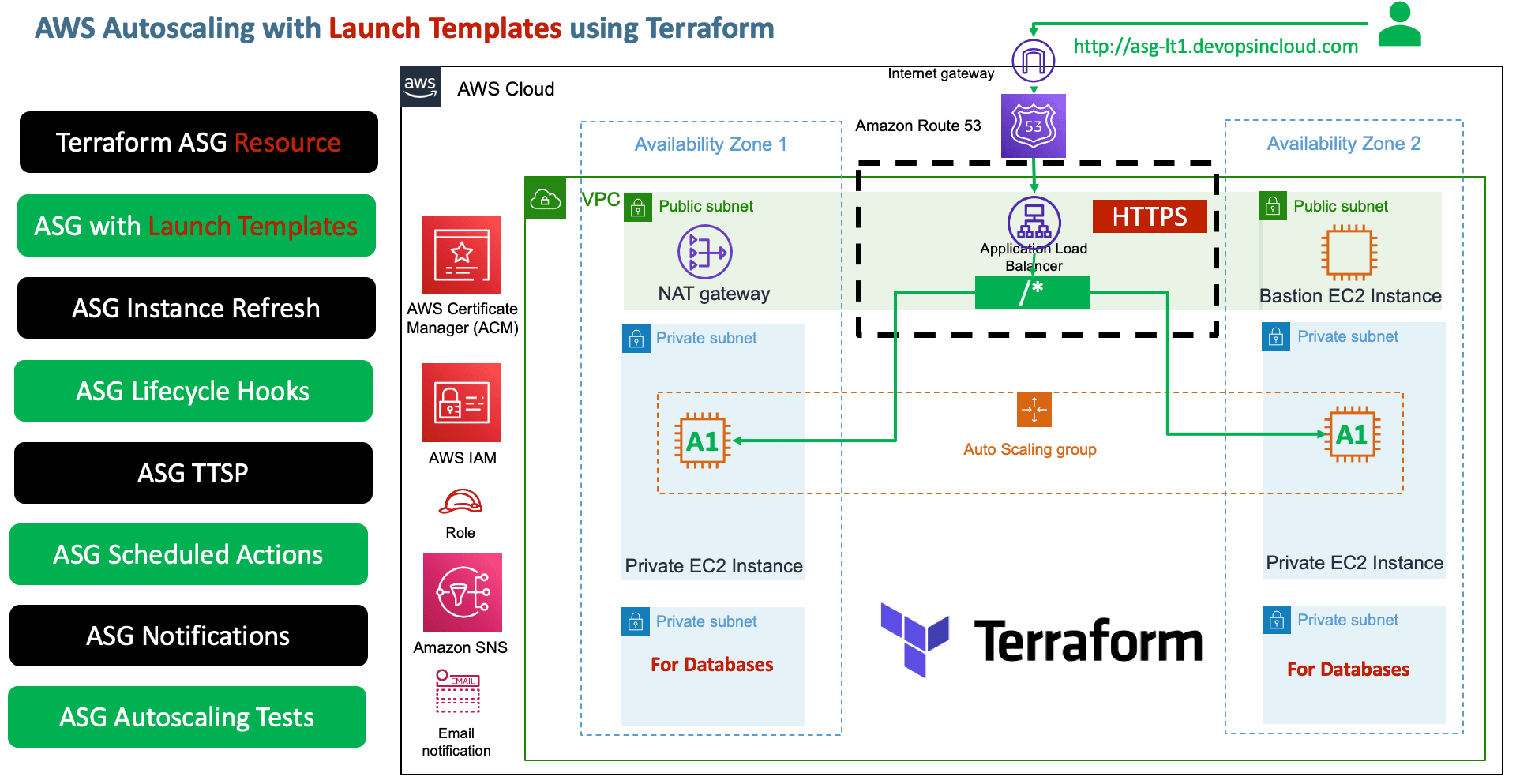
- Create Launch Templates using Terraform Resources
- Create Autoscaling Group using Terraform Resources
- Create Autoscaling following features using Terraform Resources
- Autoscaling Notifications
- Autoscaling Scheduled Actions
- Autoscaling Target Tracking Scaling Policies (TTSP)
Step-01: Create Launch Templates Manually to Understand more
- Create Launch templates manually
- Scenario-1: Create base Launch Template (standardized template)
- Scenario-2: Create App1 Launch Template referencing the base template by adding additional features to it
- Scenario-3: Create new version of App1 Launch Template and also switch the default version of Launch Template
- We already know about Autoscaling Groups which we learned in launch configurations, so we can ignore that and move on to creating all these with Terraform.
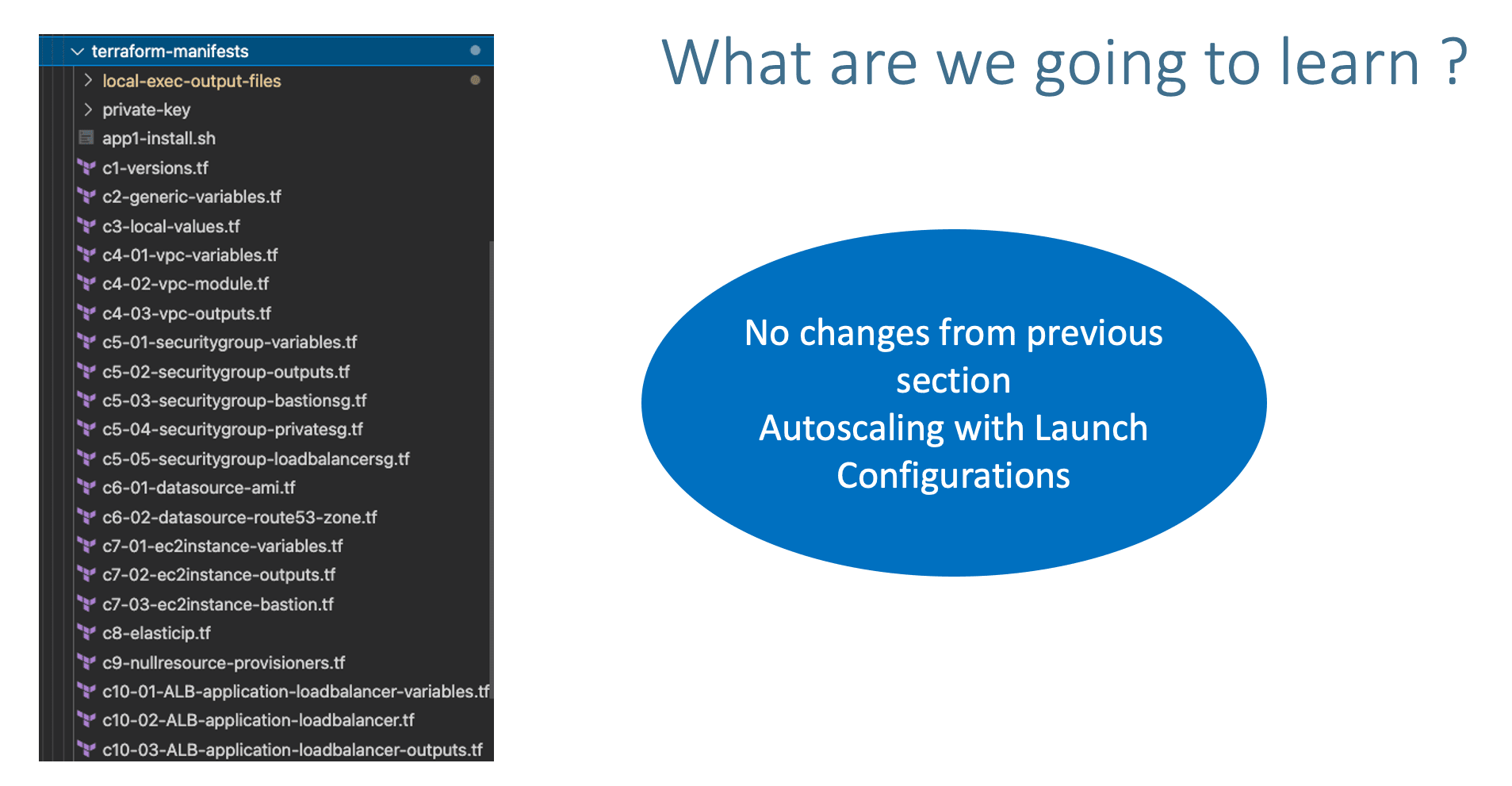
Step-02: Review existing configuration files
- Copy
c1 to c12from Section-1414-Autoscaling-with-Launch-Configuration
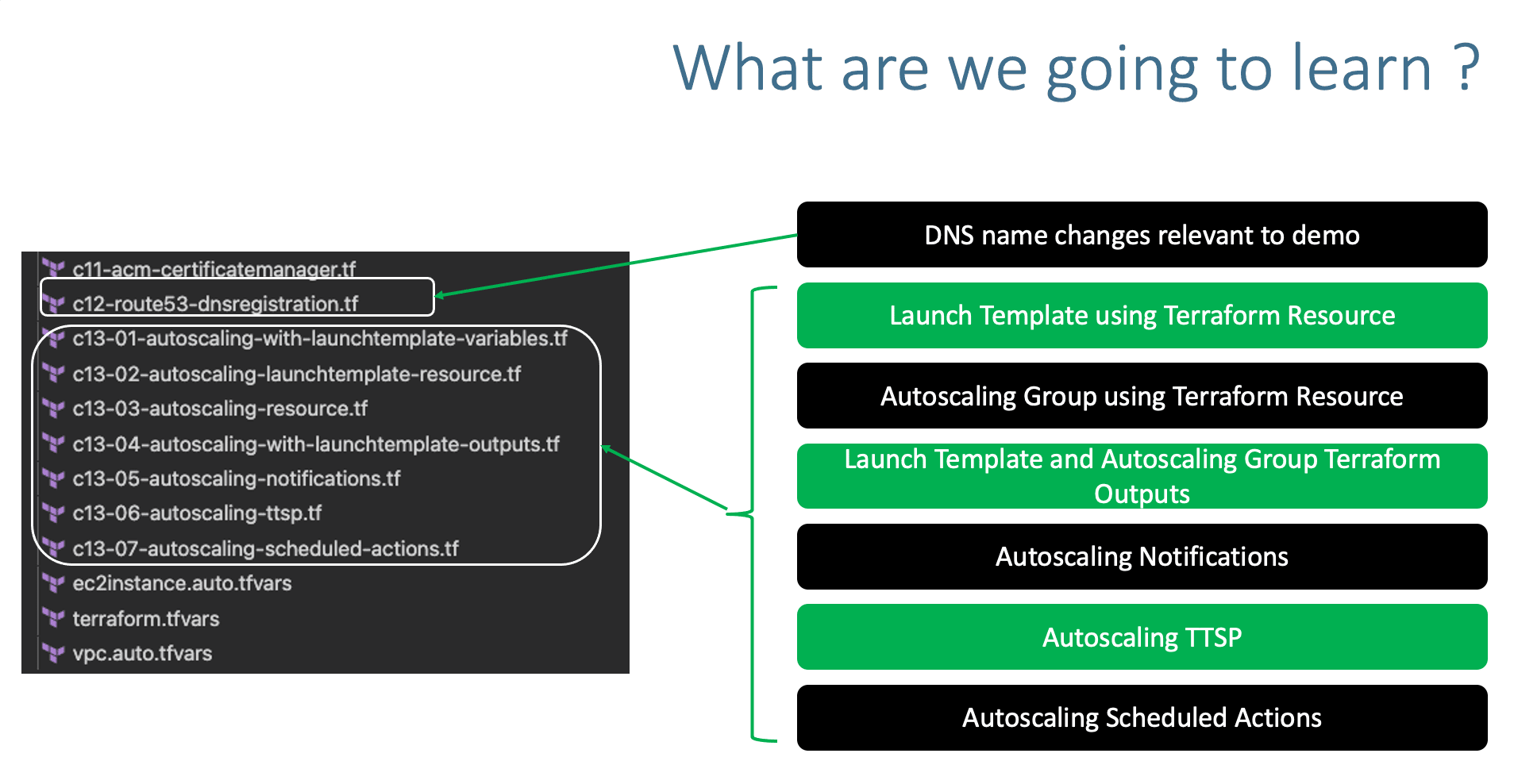
Step-03: c12-route53-dnsregistration.tf
- Update DNS name relevant to demo
Step-04: c13-01-autoscaling-with-launchtemplate-variables.tf
- Place holder file to define variables for autoscaling
Step-05: c13-02-autoscaling-launchtemplate-resource.tf
- Define Launch Template Resource
# Launch Template Resource
resource "aws_launch_template" "my_launch_template" {
  name = "my-launch-template"
  description = "My Launch Template"
  image_id = data.aws_ami.amzlinux2.id
  instance_type = var.instance_type

  vpc_security_group_ids = [module.private_sg.security_group_id]
  key_name = var.instance_keypair
  user_data = filebase64("${path.module}/app1-install.sh")
  ebs_optimized = true
  #default_version = 1
  update_default_version = true
  block_device_mappings {
    device_name = "/dev/sda1"
    ebs {
      volume_size = 10
      #volume_size = 20 # LT Update Testing - Version 2 of LT
      delete_on_termination = true
      volume_type = "gp2" # default is gp2
     }
  }
  monitoring {
    enabled = true
  }

  tag_specifications {
    resource_type = "instance"
    tags = {
      Name = "myasg"
    }
  }
}
Step-06: c13-03-autoscaling-resource.tf
- Define Autoscaling Group Terraform Resource
# Autoscaling Group Resource
resource "aws_autoscaling_group" "my_asg" {
  name_prefix = "myasg-"
  desired_capacity   = 2
  max_size           = 10
  min_size           = 2
  vpc_zone_identifier  = module.vpc.private_subnets
  /*[
    module.vpc.private_subnet[0],
    module.vpc.private_subnet[1]
  ]*/
  target_group_arns = module.alb.target_group_arns
  health_check_type = "EC2"
  #health_check_grace_period = 300 # default is 300 seconds
  # Launch Template
  launch_template {
    id      = aws_launch_template.my_launch_template.id
    version = aws_launch_template.my_launch_template.latest_version
  }
  # Instance Refresh
  instance_refresh {
    strategy = "Rolling"
    preferences {
      #instance_warmup = 300 # Default behavior is to use the Auto Scaling Group's health check grace period.
      min_healthy_percentage = 50
    }
    triggers = [ /*"launch_template",*/ "desired_capacity" ] # You can add any argument from ASG here, if those has changes, ASG Instance Refresh will trigger
  }
  tag {
    key                 = "Owners"
    value               = "Web-Team"
    propagate_at_launch = true
  }
}
Step-07: c13-04-autoscaling-with-launchtemplate-outputs.tf
- Define Launch Template and Autoscaling basic outputs
# Launch Template Outputs
output "launch_template_id" {
  description = "Launch Template ID"
  value = aws_launch_template.my_launch_template.id
}

output "launch_template_latest_version" {
  description = "Launch Template Latest Version"
  value = aws_launch_template.my_launch_template.latest_version
}

# Autoscaling Outputs
output "autoscaling_group_id" {
  description = "Autoscaling Group ID"
  value = aws_autoscaling_group.my_asg.id
}

output "autoscaling_group_name" {
  description = "Autoscaling Group Name"
  value = aws_autoscaling_group.my_asg.name
}

output "autoscaling_group_arn" {
  description = "Autoscaling Group ARN"
  value = aws_autoscaling_group.my_asg.arn
}
Step-08: c13-05-autoscaling-notifications.tf
# Autoscaling Notifications
## SNS - Topic
resource "aws_sns_topic" "myasg_sns_topic" {
  name = "myasg-sns-topic"
}

## SNS - Subscription
resource "aws_sns_topic_subscription" "myasg_sns_topic_subscription" {
  topic_arn = aws_sns_topic.myasg_sns_topic.arn
  protocol  = "email"
  endpoint  = "stacksimplify@gmail.com"
}

## Create Autoscaling Notification Resource
resource "aws_autoscaling_notification" "myasg_notifications" {
  group_names = [aws_autoscaling_group.my_asg.id]
  notifications = [
    "autoscaling:EC2_INSTANCE_LAUNCH",
    "autoscaling:EC2_INSTANCE_TERMINATE",
    "autoscaling:EC2_INSTANCE_LAUNCH_ERROR",
    "autoscaling:EC2_INSTANCE_TERMINATE_ERROR",
  ]
  topic_arn = aws_sns_topic.myasg_sns_topic.arn
}
Step-09: c13-06-autoscaling-ttsp.tf
###### Target Tracking Scaling Policies ######
# TTS - Scaling Policy-1: Based on CPU Utilization
# Define Autoscaling Policies and Associate them to Autoscaling Group
resource "aws_autoscaling_policy" "avg_cpu_policy_greater_than_xx" {
  name                   = "avg-cpu-policy-greater-than-xx"
  policy_type = "TargetTrackingScaling" # Important Note: The policy type, either "SimpleScaling", "StepScaling" or "TargetTrackingScaling". If this value isn't provided, AWS will default to "SimpleScaling."
  autoscaling_group_name = aws_autoscaling_group.my_asg.id
  estimated_instance_warmup = 180 # defaults to ASG default cooldown 300 seconds if not set
  # CPU Utilization is above 50
  target_tracking_configuration {
    predefined_metric_specification {
      predefined_metric_type = "ASGAverageCPUUtilization"
    }
    target_value = 50.0
  }

}

# TTS - Scaling Policy-2: Based on ALB Target Requests
resource "aws_autoscaling_policy" "alb_target_requests_greater_than_yy" {
  name                   = "alb-target-requests-greater-than-yy"
  policy_type = "TargetTrackingScaling" # Important Note: The policy type, either "SimpleScaling", "StepScaling" or "TargetTrackingScaling". If this value isn't provided, AWS will default to "SimpleScaling."
  autoscaling_group_name = aws_autoscaling_group.my_asg.id
  estimated_instance_warmup = 120 # defaults to ASG default cooldown 300 seconds if not set
  # Number of requests > 10 completed per target in an Application Load Balancer target group.
  target_tracking_configuration {
    predefined_metric_specification {
      predefined_metric_type = "ALBRequestCountPerTarget"
      resource_label =  "${module.alb.lb_arn_suffix}/${module.alb.target_group_arn_suffixes[0]}"
    }
    target_value = 10.0
  }
}
Step-10: c13-07-autoscaling-scheduled-actions.tf
## Create Scheduled Actions
### Create Scheduled Action-1: Increase capacity during business hours
resource "aws_autoscaling_schedule" "increase_capacity_7am" {
  scheduled_action_name  = "increase-capacity-7am"
  min_size               = 2
  max_size               = 10
  desired_capacity       = 8
  start_time             = "2030-03-30T11:00:00Z" # Time should be provided in UTC Timezone (11am UTC = 7AM EST)
  recurrence             = "00 09 * * *"
  autoscaling_group_name = aws_autoscaling_group.my_asg.id
}
### Create Scheduled Action-2: Decrease capacity during business hours
resource "aws_autoscaling_schedule" "decrease_capacity_5pm" {
  scheduled_action_name  = "decrease-capacity-5pm"
  min_size               = 2
  max_size               = 10
  desired_capacity       = 2
  start_time             = "2030-03-30T21:00:00Z" # Time should be provided in UTC Timezone (9PM UTC = 5PM EST)
  recurrence             = "00 21 * * *"
  autoscaling_group_name = aws_autoscaling_group.my_asg.id
}
Step-11: Execute Terraform Commands
# Terraform Initialize
terraform init

# Terrafom Validate
terraform validate

# Terraform Plan
terraform plan

# Terraform Apply
terraform apply -auto-approve
Step-12: Verify the AWS resources created
- Confirm SNS Subscription in your email
- Verify EC2 Instances
- Verify Launch Templates (High Level)
- Verify Autoscaling Group (High Level)
- Verify Load Balancer
- Verify Load Balancer Target Group - Health Checks
- Verify Autoscaling Group Features In detail
- Details Tab
- ASG Group Details
- Launch Configuration
- Activity Tab
- Automatic Scaling
- Target Tracking Scaling Policies (TTSP)
- Scheduled Actions
- Instance Management
- Instances
- Lifecycle Hooks
- Monitoring
- Autoscaling
- EC2
- Instance Refresh Tab
- Access and Test
Step-13: Update Launch Template and Verify
# Before
    ebs {
      volume_size = 10
      #volume_size = 20 # LT Update Testing - Version 2 of LT
      delete_on_termination = true
      volume_type = "gp2" # default is gp2
     }

# After
    ebs {
      #volume_size = 10
      volume_size = 20 # LT Update Testing - Version 2 of LT
      delete_on_termination = true
      volume_type = "gp2" # default is gp2
     }
# Terraform Plan
terraform plan

# Terraform Apply
terraform apply -auto-approve

# Observation
1. Consistently monitor the Autoscaling "Activity" and "Instance Refresh" tabs.
2. In close to 5 to 10 minutes, instances will be refreshed
3. Verify EC2 Instances, old will be terminated and new will be created
Step-14: Clean-Up
# Terraform Destroy
terraform destroy -auto-approve

# Clean-Up Files
rm -rf .terraform*
rm -rf terraform.tfstate*
Additional Troubleshooting
$ terraform import aws_launch_template.web lt-12345678

terraform import aws_launch_template.mytemp lt-02a572ea76508f68d
🎉 New Course
Ultimate DevOps Real-World Project Implementation on AWS
$15.99
$84.99
81% OFF
SEP2026
Enroll Now on Udemy →
🎉 Offer